Craftdot
Large-Print Word Search Printable: Three Puzzles, Free PDF
Three free word search puzzles set in genuinely large letters, with answer keys. Letter and A4, light on ink, no signup. Print and solve.
No email or signup. Printing instructions are below.
On this page
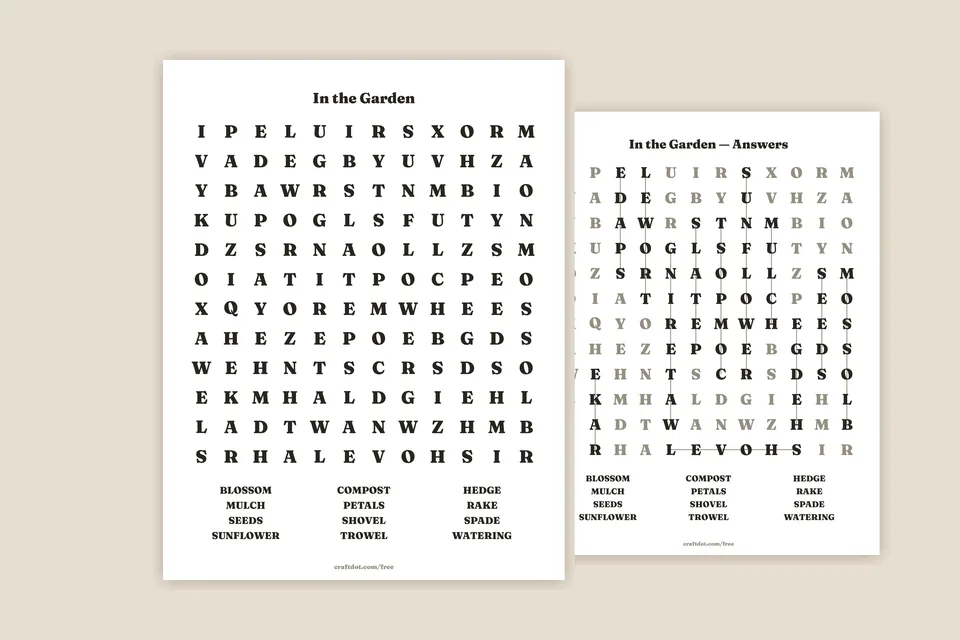
You will finish this with three word searches printed in letters you can actually read across a kitchen table. The three puzzles are In the Garden, In the Kitchen, and The Craft Cupboard, with the three answer keys together after them. Print, and you are done.
The usual free word search packs a long word list into a dense grid, which looks generous on a screen and comes out cramped on paper. These go the other way: twelve letters across a full sheet, twelve words each, and capitals that measure 6.7mm, a shade over a quarter of an inch, which is big enough to read without squinting.
Download: Large-print word searches, free PDF, Letter + A4. No signup, no tricks.
What you need
- The PDF
- Plain printer paper, 80gsm is right, there is nothing to cut out
- A pen or a soft pencil
That is genuinely it.
What is in the file
Six sheets, twice over, once sized for US Letter and once for A4:
- In the Garden. Trowel, compost, sunflower and nine more.
- In the Kitchen. Kettle, colander, skillet and nine more.
- The Craft Cupboard. Thimble, stencil, twine and nine more.
Then the three answer keys, in the same order. On an answer sheet the words you were looking for are printed in solid black with a line drawn through each one, and everything else drops back to a soft grey, so the answer is legible from across the room rather than being a second puzzle.
Words run in all eight directions, forwards and backwards. That is the standard difficulty rather than the hard one, and there is no diagonal-only setting hiding here.
How to print it
- Print the page size that matches your paper. Both are in the one file. Letter is first, A4 second.
- Set Actual Size, not Fit to Page. Fit to Page shrinks the sheet a few percent. It will not ruin a word search the way it ruins graph paper, but it is the setting that makes "large print" quietly stop being large.
- Print the puzzle page and skip the answer page if you are handing it to someone. The pages are in puzzle-puzzle-puzzle-answer-answer-answer order for exactly that reason, so you can print pages 1 to 3 and keep the keys to yourself.
- One-sided. Duplex will put an answer on the back of a puzzle, which ends the game rather quickly.
About the ink
A page like this is mostly white, and it should be. We measure every functional printable before it ships and refuse anything over 15% coverage. The puzzle pages here come in at about 7.6%, and the answer pages are not far behind them. Most of their letters are grey, which is lighter on the page, but every one of them still prints, so a key costs nearly as much to run as a puzzle.
That figure comes out of the build itself: we measure the finished PDF rather than working it out afterwards. A sheet that drinks a cartridge is not really free.
Making them harder or easier
The honest answer is that you cannot, from the PDF, because it is a finished file, not a generator. What you can do:
- Easier: fold the word list under and read it out loud one word at a time, so the solver only hunts for one thing at a time.
- Harder: cover the word list entirely and say only how many words there are. Twelve unknown words in a 12×12 grid is a genuinely long sit.
- For two people: print two copies of the same puzzle and race. The grids are identical, so it is a fair race.
There is one themed set already: the large-print Christmas word searches are these same letters with Christmas lists (around the tree, Christmas baking, wrapping presents) and their own answer keys.
If you want a theme we have not made, like another season, a place, or a set of names, tell us. Themes are cheap for us to add.
Where else this comes in handy
The same sheets work as a quiet-table activity at a family gathering, a waiting-room filler, or something to put out when someone wants their hands busy without straining their eyes. If you are printing a batch of activity pages, the dots and boxes sheet and the tic-tac-toe boards print on the same plain paper, and every download we have is on one page.
Common questions
How large is the large print?
The capital letters measure 6.7mm on US Letter and 6.4mm on A4. You can check ours against a ruler after printing, which is the point of publishing the number.
Are answer keys included?
Yes. All three puzzles come with their own answer key in the same file, so nobody has to admit defeat quietly.
Will it use a lot of ink?
No. The grids are black text on white with no background fill and no border art, which is most of why a puzzle sheet gets expensive to print.